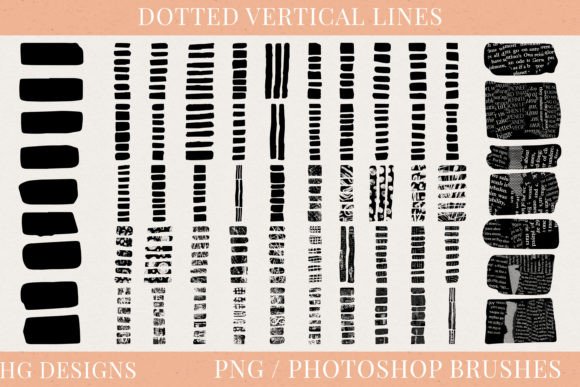
Dotted Vertical Lines Photoshop Brushes
Creating perfectly straight, consistent vertical lines in digital design can be surprisingly tedious. Whether you are sketching a layout, designing a scrapbook page, or preparing a sublimation file, manually drawing these elements often leads to uneven spacing and shaky strokes. This is where Dotted Vertical Lines Photoshop Brushes become an essential tool for creators at every level. Instead of fighting with the pen tool or struggling to align shapes, you can simply click once to generate a flawless line that extends exactly as far as you need it to.
This specific collection offers a robust solution for designers who value precision and speed. It includes a set of 50 unique dotted vertical lines, each crafted to serve different aesthetic needs. From fine, delicate dots to bold, rhythmic patterns, the variety ensures that there is a style suitable for almost any project. The real power lies in the technical specifications: every line is provided in high-quality PNG format at 300dpi and stands an impressive 5000 pixels tall. This resolution guarantees crisp edges even when printed on large formats, eliminating the pixelation issues that often plague lower-quality assets.
Why High-Resolution Assets Matter for Your Work
When working on professional projects, the quality of your source files dictates the final outcome. Many free brush sets available online are created at low resolutions, making them suitable only for small web graphics. However, this set of Dotted Vertical Lines Photoshop Brushes is engineered for versatility. The 300dpi standard is the industry benchmark for print media, ensuring that your designs look sharp whether they appear on a business card or a billboard.
The height of 5000 pixels is another critical feature. In digital art, brushes often fade out or distort if you try to stretch them too far. With these pre-rendered lines, you have enough length to cover entire pages without needing to repeat the pattern or stitch multiple images together. This seamless capability is particularly valuable for creating instant wall art or long banners where continuity is key. You gain the freedom to design with confidence, knowing that the texture and spacing of the dots will remain consistent from top to bottom.
Seamless Integration into Photoshop
One of the most time-consuming aspects of using digital assets is the setup process. Fortunately, this collection prioritizes user experience by including all 50 variations in a single .abr brush file. This format allows for effortless loading directly into Adobe Photoshop. Once installed, these tools become part of your permanent toolkit, accessible with just a few clicks within the Brush panel.
Using these brushes transforms the workflow for both beginners and professionals. For a novice user, it removes the complexity of masking and layer manipulation required to create dotted lines manually. For a seasoned pro, it accelerates the iteration process, allowing you to test different line weights and styles instantly. You can adjust the opacity, flow, and color of the brush to match your specific palette, giving you complete creative control while maintaining the structural integrity of the original design.
Practical Applications Across Industries
The utility of Dotted Vertical Lines Photoshop Brushes extends far beyond simple decoration. These assets are designed to solve real-world design challenges across various mediums:
- Digital Design and Web Layouts: Use these lines to create elegant dividers between sections of a website, separate menu items, or add subtle structure to social media graphics. They provide visual hierarchy without overwhelming the content.
- Sublimation Printing: If you run a merchandise business, these high-resolution lines are perfect for printing on mugs, tumblers, and t-shirts. The clarity of the 300dpi PNG files ensures that the ink transfers cleanly, resulting in vibrant, durable products.
- Instant Wall Art: Create modern, minimalist posters by combining these lines with typography or geometric shapes. The 5000-pixel height allows you to design floor-to-ceiling murals or large-scale prints that maintain their quality when scaled up.
- Paper Crafts and Scrapbooking: Digital planners and printable journals often require decorative borders and section markers. These brushes make it easy to customize templates for junk journaling, decoupage, and collage projects before sending them to the printer.
Ideas for Hobbyists and Small Business Owners
For hobbyists engaged in junk journaling or mixed media art, having a library of reliable digital textures can save hours of cutting and pasting physical materials. You can print these dotted lines onto textured paper, cut them out, and use them as embellishments in your physical scrapbooks. Alternatively, keep them entirely digital to enhance your planner stickers or printable calendars.
Small business owners and entrepreneurs can leverage these assets to elevate their brand identity. A consistent use of specific dotted line styles across packaging, invoices, and marketing materials creates a cohesive visual language. For example, a boutique clothing brand might use a fine, elegant dotted line to frame product descriptions on their hang tags, while a tech startup might opt for a bolder, more industrial version for their presentation slides. The ability to quickly swap between the 50 different styles means you can A/B test your designs to see which resonates best with your audience.
What to Consider Before You Start
While these brushes offer immense flexibility, there are a few practical considerations to keep in mind to get the best results. First, ensure your Photoshop document settings match the intended output. If you are designing for print, set your canvas to 300dpi to fully utilize the resolution of the PNG files. If you are working on a web project, a lower resolution may suffice, but the high-quality source files give you the option to scale down without losing detail.
Secondly, think about the context of your design. Dotted lines are excellent for guiding the eye or adding texture, but they should not compete with the main subject of your artwork. Because these lines are vertical, they naturally draw attention upward or downward. Use this property intentionally to lead viewers through your composition. Additionally, since the lines are 5000 pixels tall, you may need to crop or mask them depending on the size of your canvas. The non-destructive nature of Photoshop layers makes this adjustment simple and reversible.
Finally, consider the color scheme. While the brushes come in a neutral state, the beauty of using .abr files is the ability to change the foreground color instantly. Experiment with contrasting colors to make the lines pop, or use a similar hue to create a subtle, sophisticated background element. By understanding how these tools function within your broader design strategy, you can transform simple dotted lines into powerful components of your creative work.